Kaveri Online Services: Check EC, Valuation and Property Registration

Kaveri online services are a system that acts as a virtual storage for data related to records of rights, tenancy and crops (RTC). Also, because of this IT initiative in public spaces, they have been awarded with many rewards and recognitions.
The user can avail various property-related and other services, where the citizens in Karnataka can visit the Kaveri Online Services portal. It is basically an official website that has been recognised nationally as a successful initiative for digitisation of land records.
Read Also: Godrej Buy 33 Acre of Land in Bannerghatta Road Bangalore
This portal enables online registration of properties and land and documentation in the state. The Stamps and Registration Department developed the Karnataka Valuation and E-registration (Kaveri). The user can download the property registration documents online with easy steps.
Read also: Top 10 Best Luxury Apartments in Gurgaon
Read Also: Buy Residential and Commercial Property in Noida
Read Also: Loan Against Property In Noida
What Services Are Available On Kaveri Online Portal?
The official Kaveri online service can be accessed on the Kaveri online system, https://kaverionline.karnataka.gov.in. Though, one can use services only with the registration but some services do not require any registration.
Services on Kaveri portal without registration
- Stamp duty and registration fee calculator.
- Property valuation.
- Marriage office.
Read Also: DLF One Midtown
Read Also: Top 10 Best Luxury Apartments in Noida
Stamp Duty And Registration Fee Calculator On Kaveri Online Services Portal
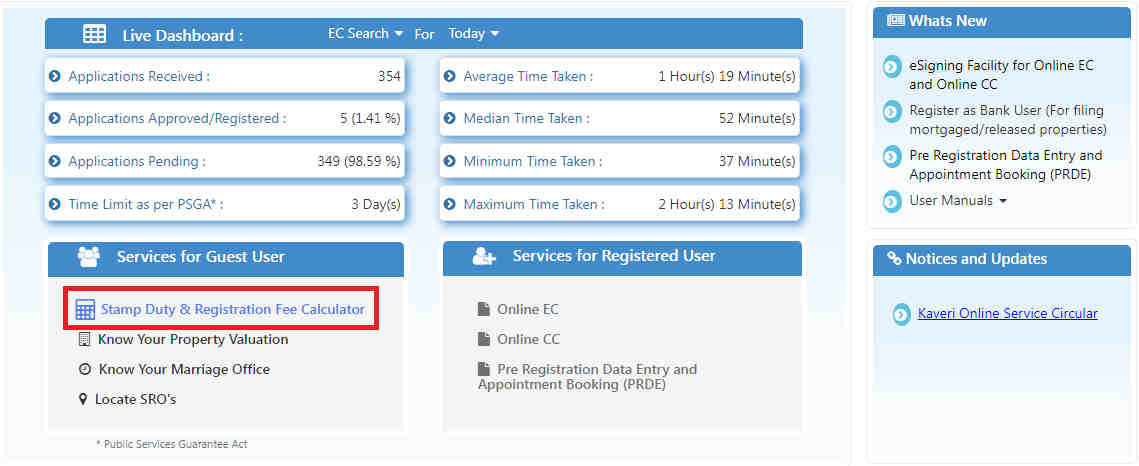
The stamp duty and registration fee calculator can be accessed without registration, a user can proceed as a guest. In order to know about these charges on various transactions just click on the ‘Stamp duty & registration fee calculator’ on the homepage.
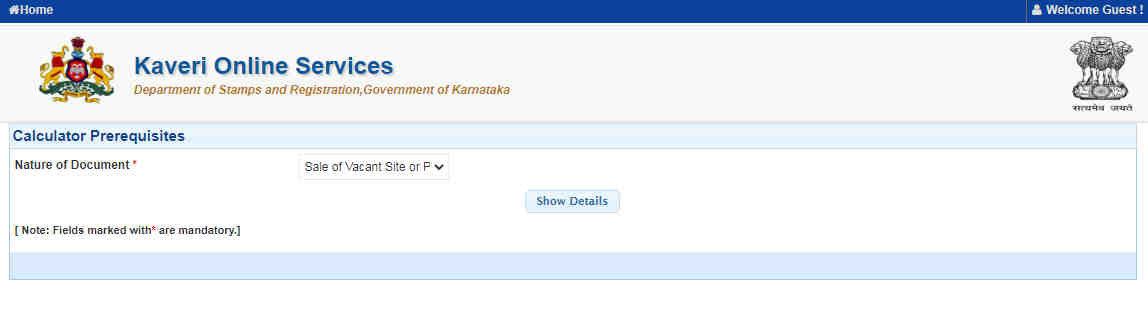
You will redirect to a new page that will open and ask you to select from various options the ‘nature of document’. Select the relevant option from the drop-down menu and hit on the ‘show details’ button.
Read Also: TARC Kirti Nagar Delhi
Read Also: Top 10 Best Luxury Apartments in Pune
Read Also: Top 10 Best Luxury Apartments in Mumbai
Read Also: M3M Projects in Gurgaon
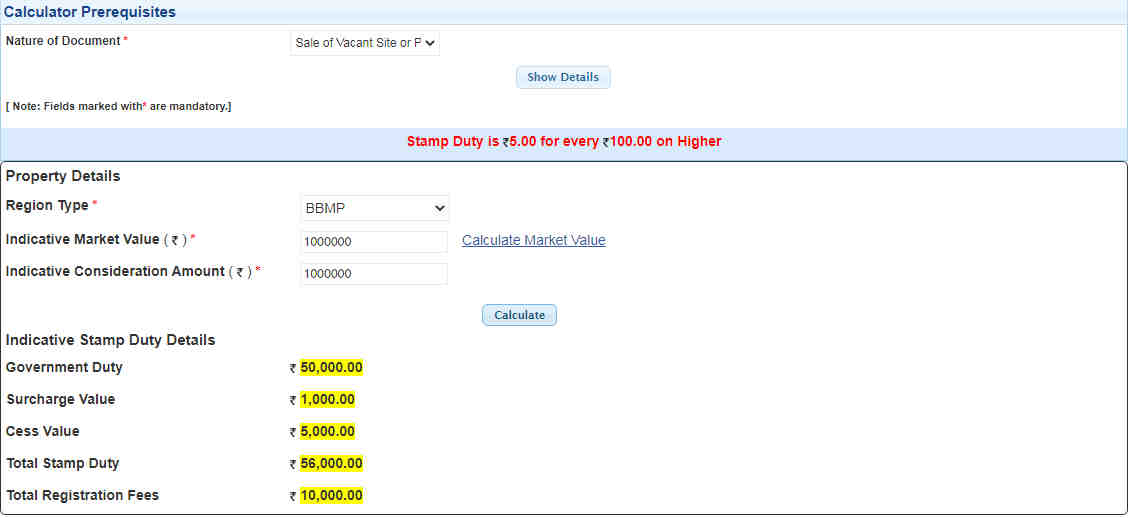
Additional details will be asked like the region of the property, the market value of the property and the consideration amount. Now, click on ‘calculate’ button as the stamp duty and registration charges for the property transaction would appear on your screen.
Read Also: TVS Emerald Singasandra Bangalore
Read Also: Godrej Pimpri Chinchwad Pune
Read Also: ATS Homekraft Rohini Delhi
Read Also: Max Sector 128 Noida
Read Also: Godrej Woodsville
Read Also: Paras Floret
Steps To Use Property Valuation Feature On Kaveri Online Services Portal
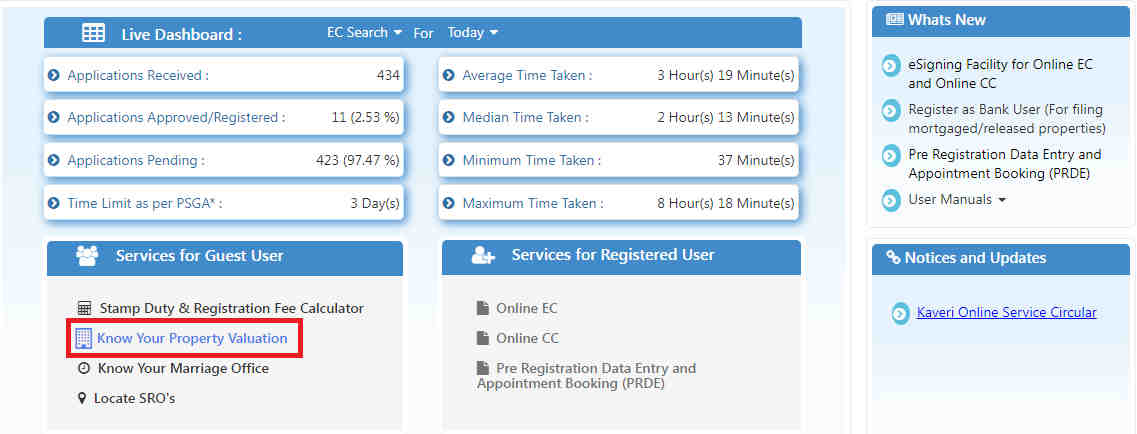
The simple steps can be used to know about your property valuation on Kaveri Online services portal. Click on ‘know your property valuation’ option on the home screen of official website.
The next page will ask the user to enter details like the district, area, property usage type, property type, area of the property and the measurement unit. Once, it is completely done, hit the ‘display valuation’ button.
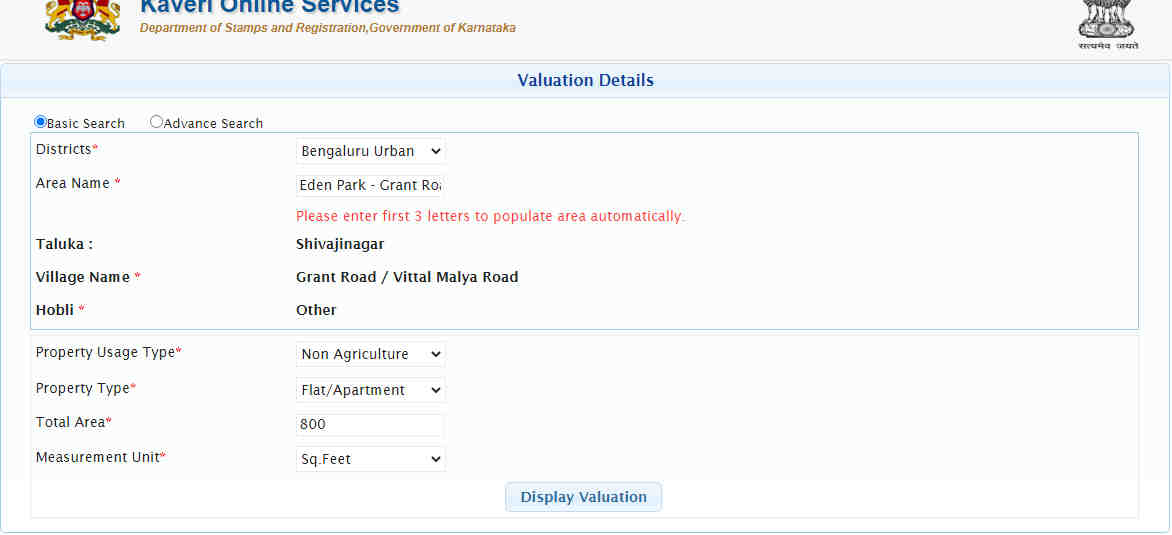
The record of property valuation will be displayed on the screen now.

Kaveri Online Services For Registered Users
- Online EC
- Online CC
- Pre-registration data entry and appointment booking (PRDE provides for online booking of time slots for registration of property.)
Read Also: M3M Sector 79 Gurgaon
Read Also: Smart World Sector 79 Gurgaon
Use Of Kaveri Online Services Portal To Book Online Appointments For Property Registration
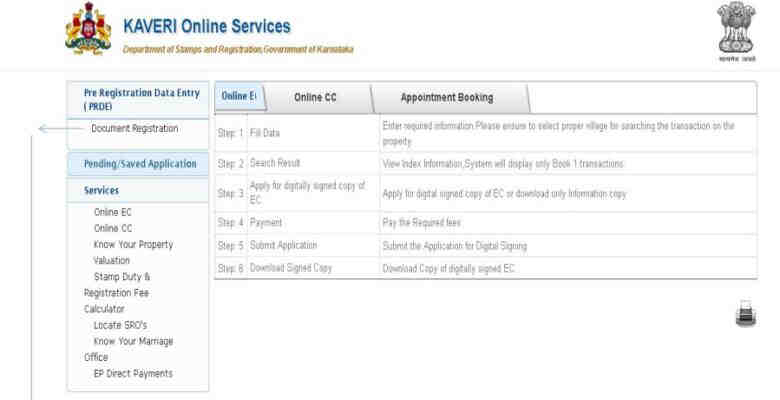
Step 1: As the registered members can access the Kaveri Online Services portal, the user must first register himself, using his given credentials.
Just after the registration process is completed, you can just click on the ‘Pre-Registration Data Entry and Appointment Booking (PRDE)’ option. On the following page that will open now, you will click on the ‘document registration’ option.
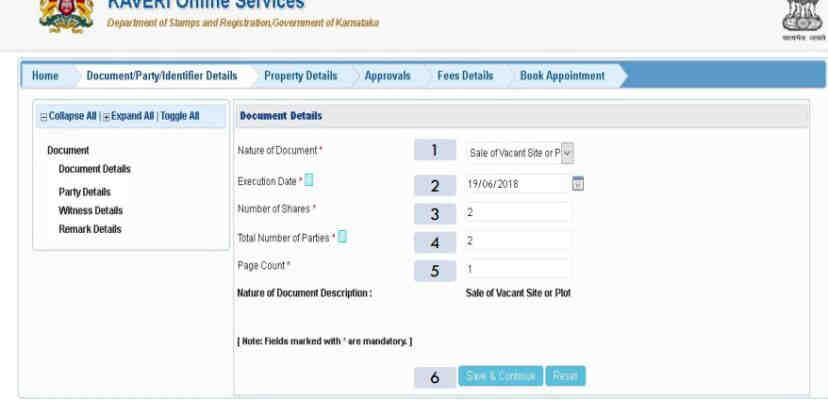
Step 2: Look at the screen, from the drop down menu you will now have to select various options so that you can initiate the document registration process. Some of the required details will include the nature of the document, execution date, the number of shares, total number of parties, page count and number of document description.
Thus, once you have filled the details, click the ‘save and continue’ button at the bottom.
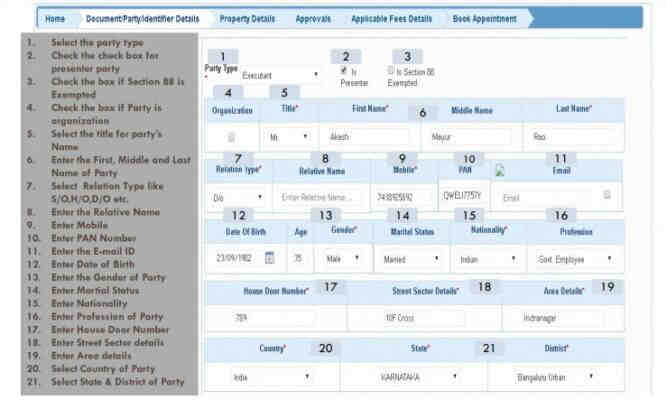
Step 3: On the subsequent page, where you will find the following options such as:
- Select the party type in box 1.
- Check box 2 for the presenter party.
- Check box 3 if Section 88 is exempted.
- Check box 4 if the party is an organisation
- Select the title for the party’s name in box 5.
- Enter the first, middle and last name of the party in the box.
- Select relation type in box 7.
- Enter the name of the relative in box 8.
- Enter the mobile number in box 9.
- Enter the PAN details in box 10.
- Enter the email ID number in box 11.
- Enter the date of birth in box 12.
- Enter the gender of the party in box 13.
- Enter the marital status of the party in box 14.
- Enter the nationality of the party in box 15.
- Enter the profession of the party in box 16.
- Enter the house door number of the party in box 17.
- Enter the street and sector details in box 18.
- Enter the area details in box 19.
- Select the country of the party in box 20.
- Select the state and the district of the party in box
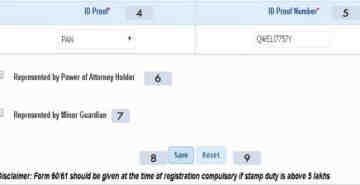
- Select ID proof type of the party in box 22.
- Select ID proof number of the party in box 23.
- Check the box if the party is represented by a power of attorney holder in box 24.
- Check the box if the party is represented by a minor’s guardian in box 25.
Now, hit the save button. You could also hit the reset button to make changes.
Read Also: Birla Sector 150 Noida
Read Also: M3M Sector 128 Noida
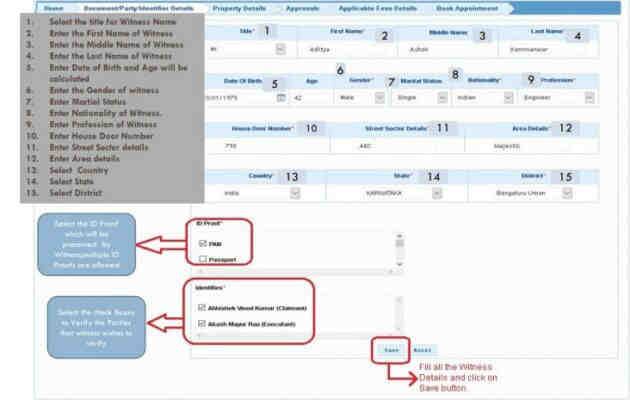
Step 4: Now, select the title for the witness name and enter the first, middle and last name of the witness. Enter the date of birth, gender, marital status, nationality, profession and address of the witness. Also select the ID proof to be produced by the witness. Now, select the check boxes to verify the parties that the witness wished to verify. Now, simply click on the ‘save’ button.
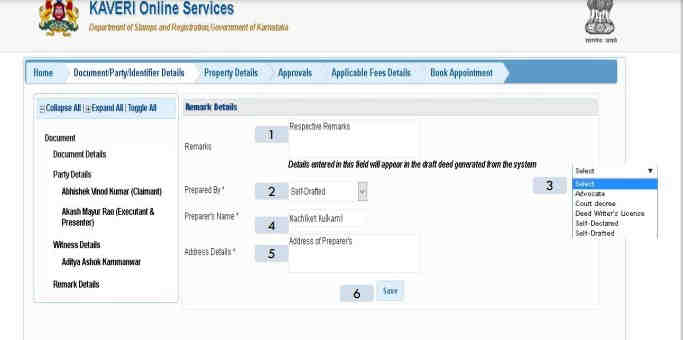
Step 5: On the next page, the person who has made the deed is needed to enter all the details of the person.
Read Also: Smart World Sector 111 Gurgaon
Read Also: L and T Sector 150 Noida
Read Also: M3M Sector 111 Gurgaon
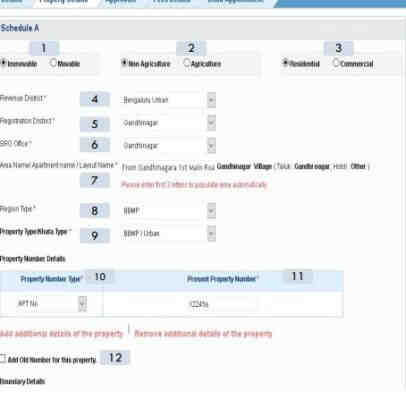
Step 6: In the next page, give all details about the property and hit save.
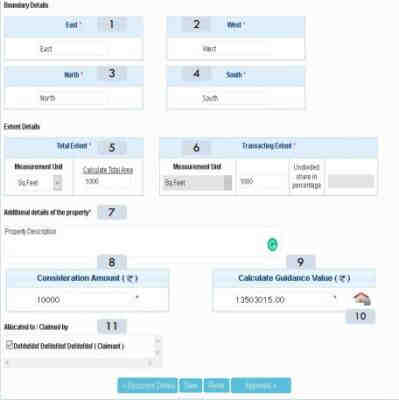
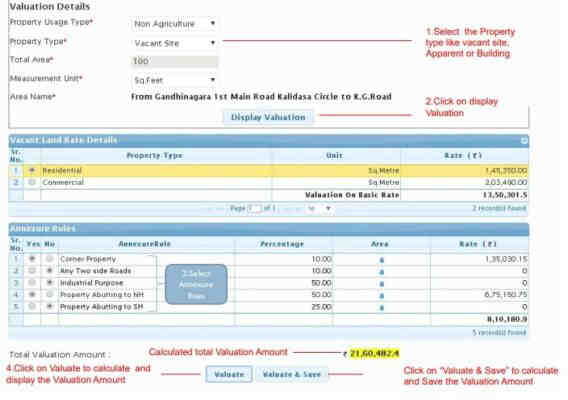
Step 7: the following page will be asking you to enter the valuation details, where you can fill in all the mandatory details. Then, after that just click on the save button.
Read Also: Godrej Properties Gurgaon
Step 8: Now, the user will upload the relevant documents required for the registration process. Then, it will also ask you to fill in the transaction payment details.
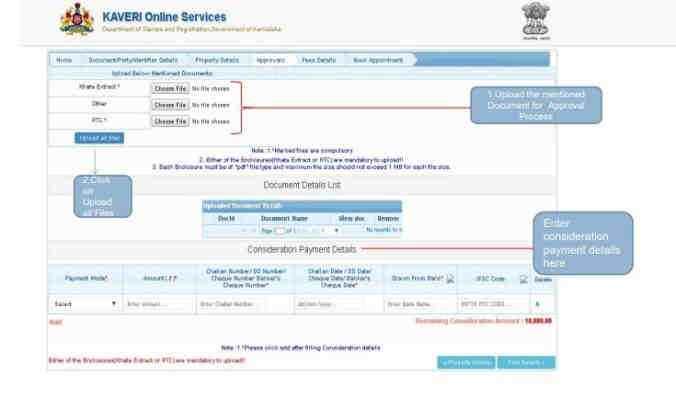
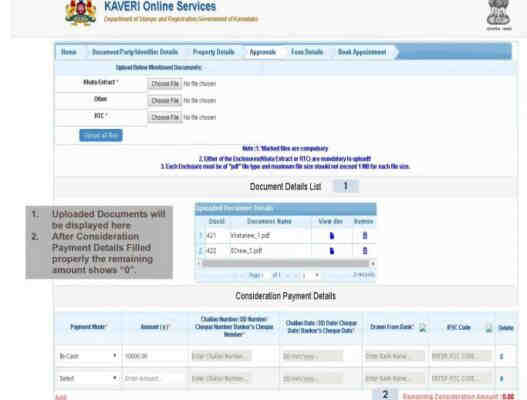
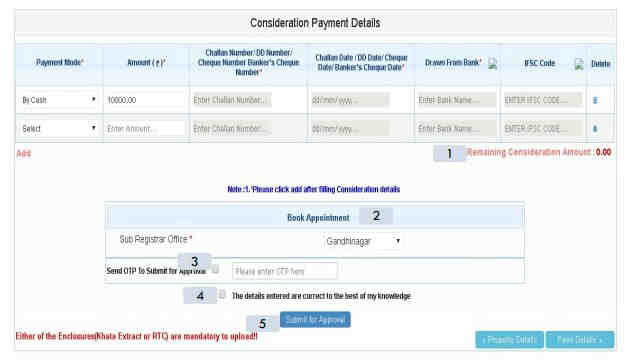
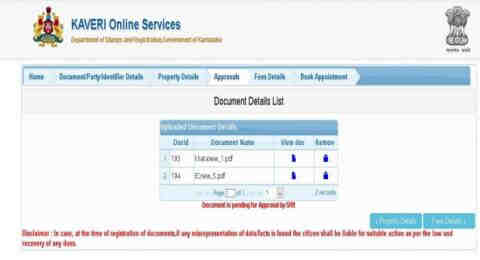
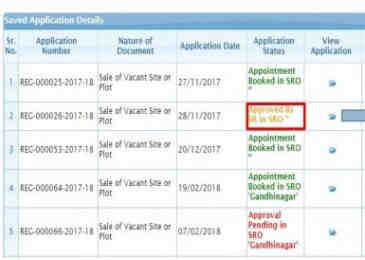
Step 9: With the saved application that can be easily viewed using the ‘pending/saved application’ option.
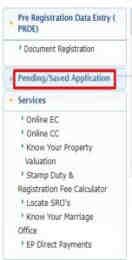
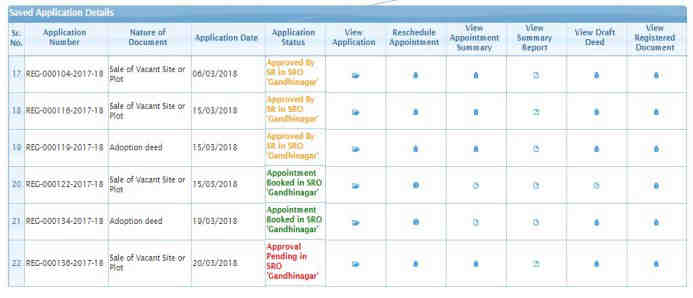
Once the application gets the approval by sub-registrar office, the status of application changes to ‘approved by SR’. Then, you can just proceed to book the appointment for the property registration in Karnataka.
Step 10: For the approved selection and proceed with the booking, just simply click on the ‘view’ option.
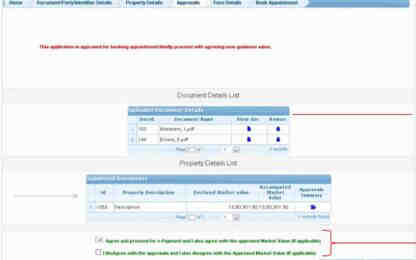
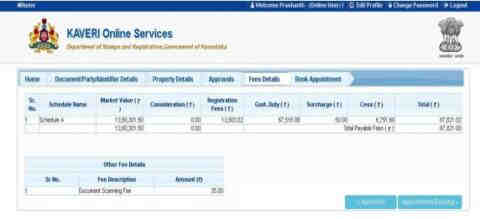
Step 11: After filling the details and everything, now just pay the fee for online appointment booking.
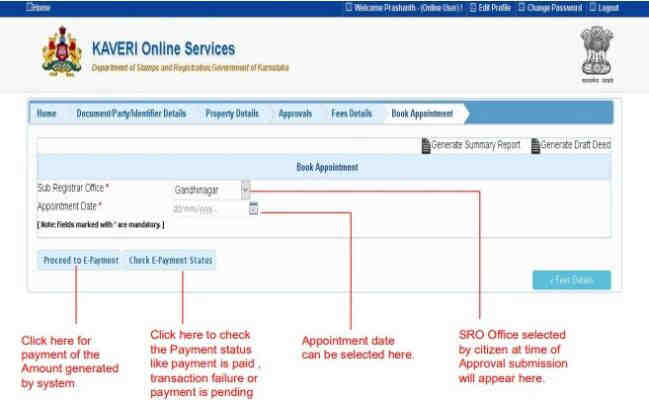
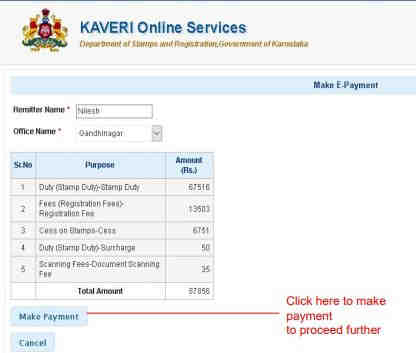
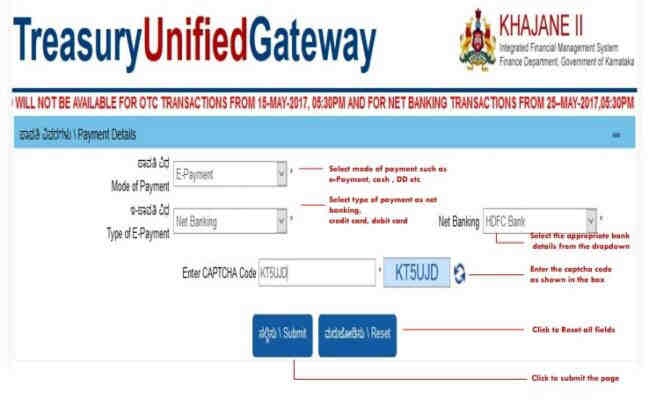
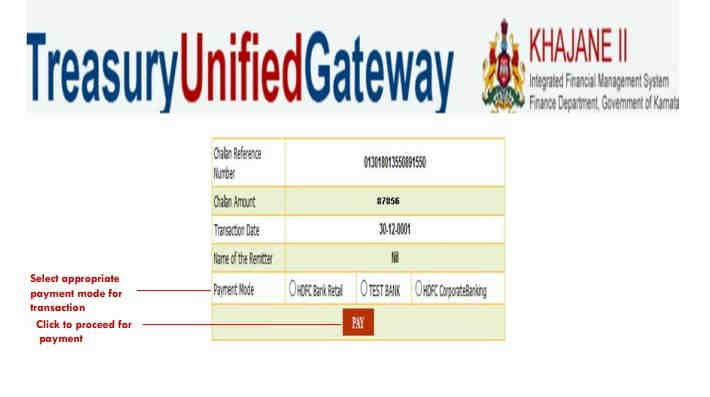
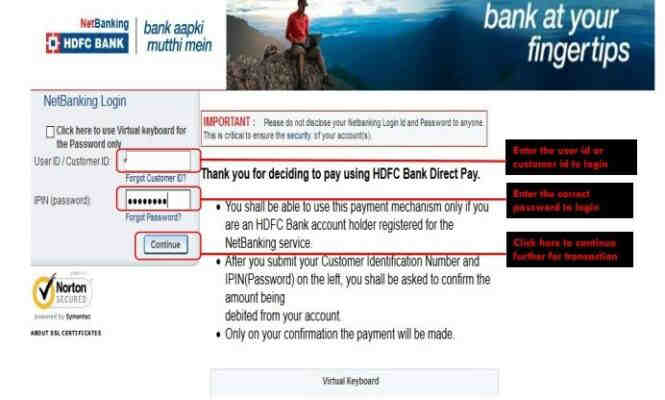
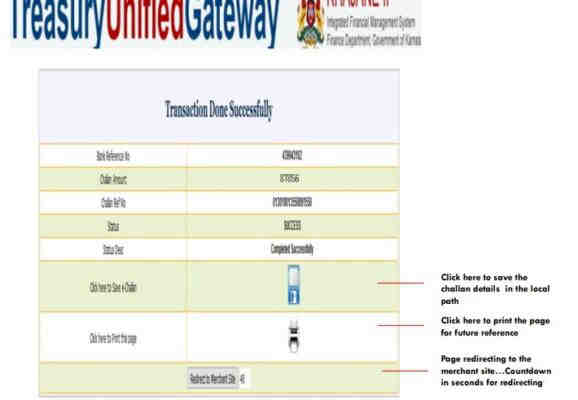
Step 12: Lastly, proceed further to finally book the appointment for property registration.
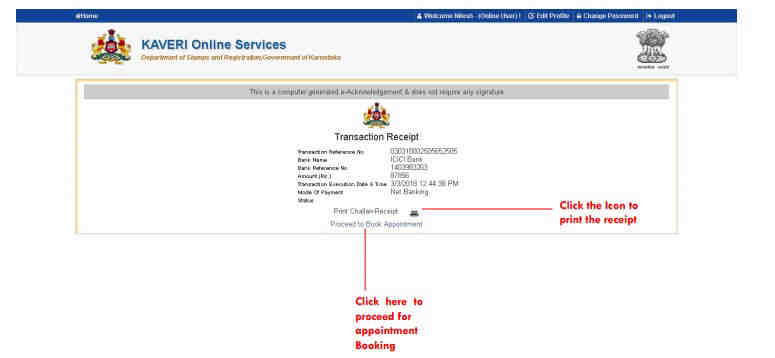
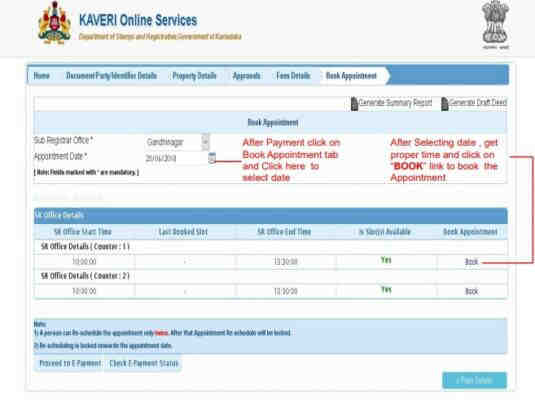
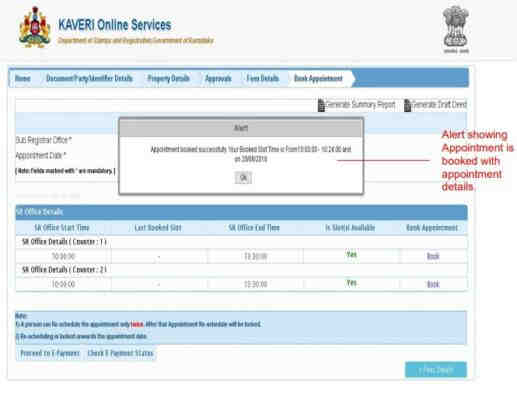
Through these steps your appointment for getting the property registration is now booked on the official Kaveri Online Services portal.
See also: Know Everything About Karnataka Housing Board (KHB)
Stamp Duty And Registration Charges On Karnataka Property
Recently on September 20, 2021, there is an amendment being made to the Stamp Act 1957 by the Karnataka State Assembly. Under this modification they have made a cut on the stamp duty on properties that are priced between Rs 35 lakhs and Rs 45 lakhs. Basically, it has moved to 3% from the previous 5%.
But these new registration charges are only applicable on the property that is being sold for the first time. If the properties are worth more than this then the buyers in Karnataka will have to pay 5% stamp duty, along with 1% registration charge.
FAQs
When was Kaveri Online Services launched?
HD Kumaraswamy, the former chief minister of Karnataka, launched Kaveri Online Services in 2018.
Why is it important to have an encumbrance certificate?
Encumbrance certificates provide information on whether there are any claims on the property title. This helps you to understand the ownership pattern on the property in question.
Read Also:- What is circle rate? How does it impact a homebuyer?
Read Also:- Why the surge in demand for 3-4 BHK apartments in Kandivali, Mumbai?
Read Also:- What are the ways to deal with illegal property possession?
Read Also:- Delhi Mumbai Expressway Route, completion date and status
Read Also:- Investing in Smart homes? Know These Tips Before Investing
Read Also:- What Should You Consider While Buying Resale Property?
Read Also:- How To Use Feng Shui Principles To Buy A House?
Read Also:- What are The Top 7 ways to increase the value of your property?
Read Also:- How to pay commercial property tax?
Read Also:- An Easy Guide To Buying A Luxury Home
Read Also:- How to buy property in Lakshadweep?
Read Also:- How the investment changes are taking place in Proptech Sector? Get complete Insight
Read Also:- Buying Property From a Reputable Developer? Know the Advantages Now
Read Also:- Why Are Gated Communities Trending These Days?
Read Also:- Top Challenges For Consumers To Buy Their Dream Property
Read Also:- Top 10 Reasons To Invest In Mumbai
Read Also:- Top 8 Reasons To Move To Bangalore
Read also: IGRS Karnataka: Use Of Kaveri Online Services And Karunadu Website
Read Also: - Top 10 Best Residential Projects in Pune
Read Also:- Top 10 Best Residential Projects in Kharadi
Read Also: - Top 10 Best Residential Projects In Undri
Read Also: - Top 10 Best Residential Projects in Wagholi
Read Also: - Top 10 Best Residential Projects In Bangalore
Read Also: - Top 15 Best Residential Projects In Gurgaon
Read Also: Top 10 Best Residential Projects In Noida Extension
Read Also: - Top 10 Best Residential Projects In Sector-150 Noida
Read Also:- Top 10 Best Residential Projects in Noida
Read Also:- Top 10 Best Residential Projects in Wakad
Read Also:- Top 10 Best Residential Projects in Bavdhan
Read Also:- Top 10 Best Residential Projects in Nibm
Read Also:- Top 10 Best Residential Projects in Talegaon
Read Also:- Top 10 Best Low Rise Apartments in Gurgaon
Read Also:- Top 10 Best Residential Projects in Mamurdi
Read Also:- Top 10 Best Residential Projects in Gurgaon
Read Also:- Top 10 Best Residential Projects in Mumbai
Read also: Top 10 Best Commercial Property in Noida
Read Also: Top 10 Best Luxury Villas in Noida
Read Also: Top 5 Best Luxury Projects in Delhi
Read Also: Top 10 Best Luxury Projects in Bangalore
Read Also: Top 10 Best Luxury Projects in Gurgaon
Read Also: Top 10 Best Residential Projects In Chennai
Read Also: Top 10 Best Residential Projects in Dwarka Expressway Gurgaon
Read Also : Assetz Group Property Bangalore Real Estate Developer And Builder
Related Articles

Types Of Building Plans How To Design, Advantages
Types Of Building Plans How To Design, AdvantagesBuilding blueprints offer an image of how a structure will look when it is finished. Contractors and

What are Home Buyers expecting from Modi Government’s Maiden Budget?
What Are Home Buyers Expecting From Modi Government’s Maiden Budget?Expecting the now-fabled "achche din," homebuyers had high hopes for the first bud

Why are smart homes gaining popularity
Why Are Smart Homes Gaining Popularity?Technology is gradually permeating the nation's housing industry. The modern home buyer is becoming more and mo

Master Plan - What is it, Importance, Advantage & How it is made
Master Plan - What Is It, Importance, Advantage & How It Is Made?The city's long-term plans are called master plans. They therefore need to be com